How to Pass the National Verifier Fast for Lifeline Service
If you want Lifeline service in 2025, your first step is the National Verifier. It confirms who you are, where you live, and whether you qualify for a program based on your income. Providers look for this approval before they enroll you.
In this guide, you’ll find a precise, step-by-step flow, a brief eligibility snapshot, a document checklist, fixes for pending issues and those requiring additional information, and clear next steps to select a provider and activate your account. Most people finish in minutes. When you are ready, head to our Apply Now pillar.
What the National Verifier Does in 2025
The Verifier confirms three things: identity, residential address, and your eligibility through either a qualifying program or household income. If databases match your records, you get instant approval. If not, you upload documents.
Who needs to apply: first-time applicants and annual recertification
- First-time verification is required for new applicants before any provider can approve service.
- Annual recertification, required for existing subscribers when USAC asks, sometimes auto-verified, sometimes you submit quick proof.
Where it fits in the flow
Verify first, then choose a provider, then activate your SIM or device. That order keeps things smooth.
Are You Likely to Qualify?
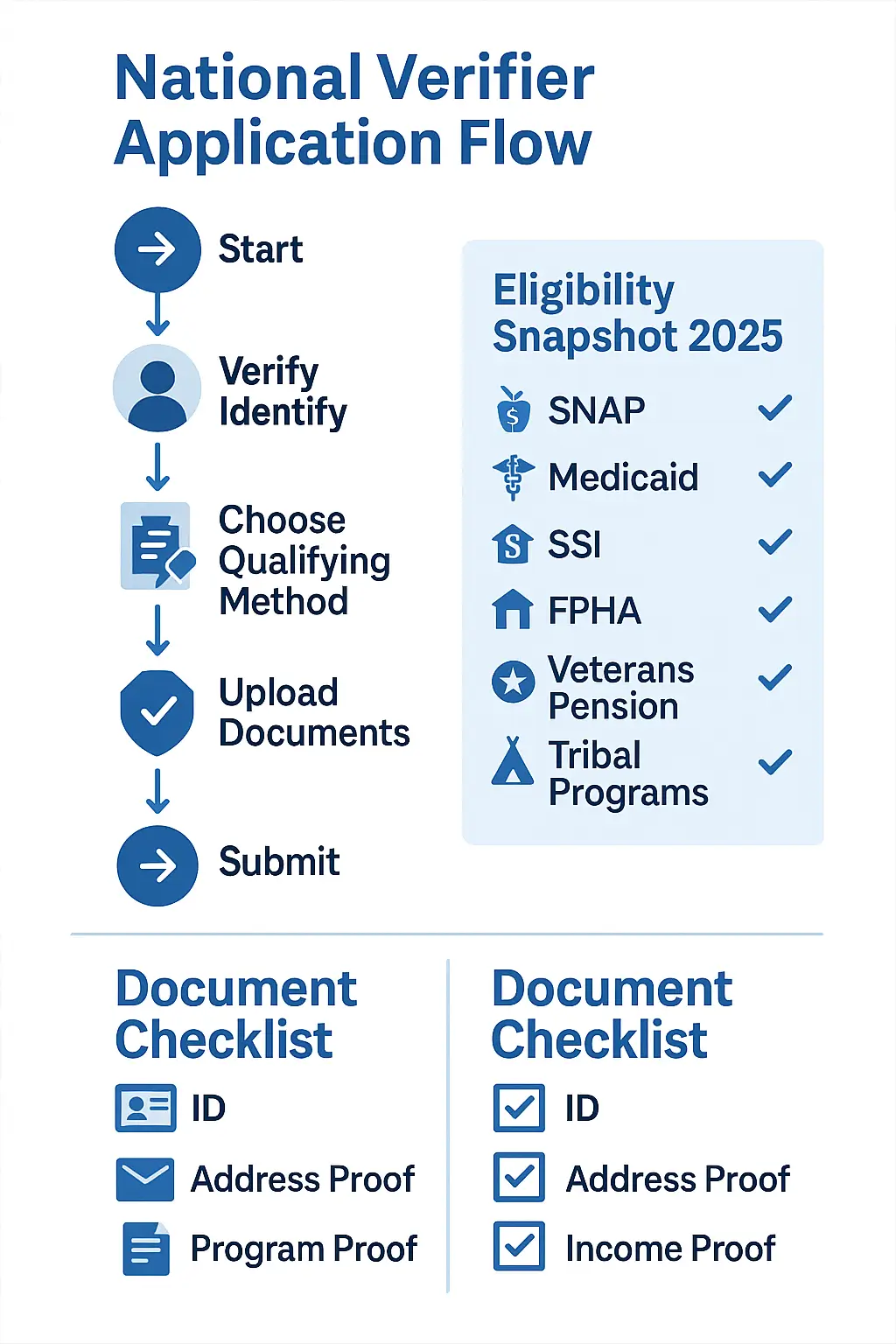
You are usually eligible if someone in your household participates in one of these qualifying programs:
- SNAP
- Medicaid
- SSI (Supplemental Security Income)
- FPHA (Federal Public Housing Assistance)
- Veterans Pension or Survivors Benefit
- Tribal programs like Tribal TANF or FDPIR
This path is often faster, because the Verifier can auto-match your record.
Quick Checklist
You can also qualify if your household income is at or below 135% of the Federal Poverty Guidelines for 2025. Typical proof includes a tax return or recent pay stubs.
Advertisement
One per household rule
Only one Lifeline benefit is allowed per household. If there are multiple households at one address, use the Household Worksheet when prompted.
What You Need Before You Start
Documents list
- Identity, a government-issued photo ID
- Address proof, a utility bill, a lease, or official mail
- Program proof, a current benefit letter or a portal screenshot with your name and date
- Income proof, a tax return or three consecutive pay stubs
Account requirements
Have a working email, a phone number for codes, and the last four of SSN or an alternate ID such as a Tribal ID.
File prep tips
Save clear JPG or PDF files. Keep all four corners visible. Use simple names, such as ID_front.jpg and Benefit_Letter_2025.pdf. Keep file sizes reasonable and text readable.
Step-by-Step: How to Use the National Verifier
Plan a screenshot for each numbered step. Capture real screen titles and buttons.
- Visit the official application page and select your state.
Start from the official Lifeline site and click Apply Online. Pick your state from the dropdown. - Create or sign in to your account.
New users create an account with an email and a password. Returning users sign in. - Please enter your personal details exactly as they appear on your ID.
Add full name, date of birth, last four SSN or Tribal ID, and residential address. Match the spelling and punctuation on your ID. - Select how you qualify, program or income.
Select ‘Program’ if you have SNAP, Medicaid, SSI, or another qualifying program. Choose Income if your household is at or below 135% of the guideline. - Upload documents, use readable scans and clear file names.
Attach current program letters or income proof. Make sure pages are sharp and complete. - Review and certify, complete the electronic signature.
Read the statements, initial where asked, and sign. - Submit the application
Click Submit. Many applicants get instant results. - Save your confirmation
Download or print the confirmation page. Please keep it for provider enrollment. - Read the decision
- Approved, proceed to provider enrollment.
- Pending, the system requires additional time or information.
- Needs more info, fix a mismatch or upload a clearer document.
- After approval, select a Lifeline provider and activate your service.
Choose a company that serves your area, complete their enrollment process, and then activate your SIM or device.
If Your Application Says Pending or Needs More Info
Common Reasons
- Name Mismatch: The spelling on the application does not match the spelling on your ID.
- Blurry Documents: low resolution or cropped edges.
- Old Benefit Letters, no current date or missing your name.
Quick Fixes
- Correct typos, match the exact name on your ID.
- Use the USPS format for your address and update the apartment or unit lines.
- Rescan at 300 dpi, showing all four corners, and ensure the dates are readable.
- Upload a current letter that clearly displays your name, program, and valid dates.
Escalation tips
If you stay pending, contact the Lifeline Support Center. Request the expected business day timeline and determine whether to reupload or mail the documents.
Program vs Income: Which Path Is Faster
- The program route is usually faster, because databases often confirm eligibility automatically.
- The income route is a good fallback if your program lapsed or you never had one; just be ready with clean pay stubs or a tax return.
State and Tribal Specific Notes
States with Extra Steps
Some states may exhibit portal handoffs or slightly more extended review periods. Follow any on-screen instructions and keep your confirmation.
Tribal Applicants
Applicants on qualifying Tribal lands get enhanced benefits. You can use a Tribal ID and proof of enrollment in a Tribal program. The core Verifier flow is the same.
Privacy and Security Checklist
- The Verifier collects identity, address, and eligibility data to decide your Lifeline status.
- Upload only the required pages; you may redact unrelated information while keeping the name, dates, and necessary fields visible.
- Use only the official site, ignore look-alike pages, and never share verification codes with strangers.
FAQs
How long does approval take in 2025?
Most people get an instant decision. Manual review can take a little longer. If you applied by mail, add mailing time.
Do I need to reapply every year?
You complete annual recertification when the USAC requests it. Sometimes it is automatic, sometimes you submit quick proof. Watch your email and mail for notices.
Can I verify without an SSN?
Yes. Tribal applicants can use a Tribal ID. If you do not have an SSN, follow the on-screen options for an alternate ID.
What if my household already has Lifeline?
Only one Lifeline benefit per household. If there are multiple households at one address, complete the Household Worksheet.
Can I switch providers after approval?
Yes. You can transfer your Lifeline benefit to another provider. Ask about device and plan changes before you move.
Is my phone unlocked after I get service?
Unlocking rules vary by provider. Ask about their policy, any usage requirements, and the timeline before you enroll.
Conclusion!
You are set. Finish your National Verifier approval, then head to our Apply Now pillar to compare Lifeline providers, complete enrollment, and activate fast. If you are still unsure, please refer to our Eligibility pillar for a clear, plain-language breakdown of program and income rules.

Olivia is a trusted benefits specialist dedicated to helping households qualify for legitimate free government iPhone and connectivity programs. She reviews every update on our website to ensure the information is clear, compliant, and aligned with official FCC and USAC guidelines. Her work strengthens the credibility of our resources so users can apply with confidence.